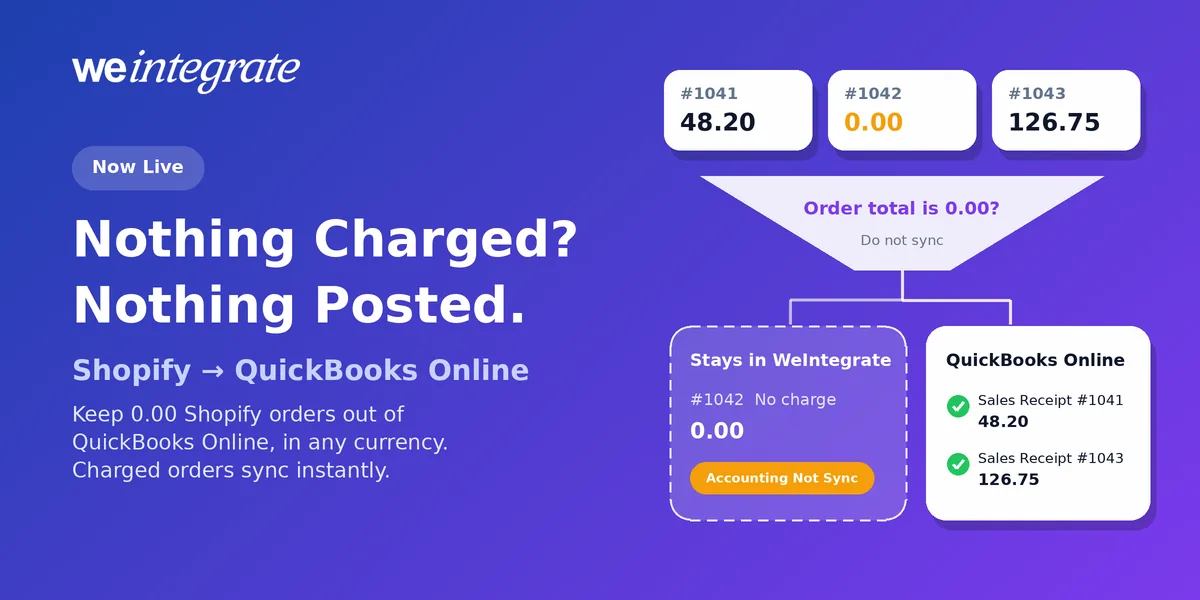
Not every Shopify order brings in money. A free admission to your workshop. A product sent out on trial before the customer decides to buy. A free sample, a warranty replacement, or a 100%-off code for a loyal customer. Each one is a real Shopify order, and each one has an order total of 0.00. Some stores want every one of those orders in QuickBooks Online as a complete record. Others would rather their QuickBooks stays about money that actually moved. Starting today, it’s your call: the new “Order total is 0.00” conditional sync rule keeps no-charge Shopify orders out of QuickBooks Online with one setting, in whatever currency your store sells in, while every charged order keeps syncing instantly as a real transaction. It has been in preview with select customers since September 30, and it’s now live.
Your QuickBooks Online, your rules — every charged Shopify order synced instantly as a real transaction, no-charge orders kept out if you prefer, reconciled exactly.
Start Your Free TrialYour Call, With One Setting
With an integration that posts your sales as a daily or per-payout lump sum, a no-charge order simply disappears into a total. You never see it, so you never get to decide anything about it.
WeIntegrate does the opposite. Every Shopify order becomes its own real transaction in QuickBooks Online, and that includes orders with nothing to pay. By default, a no-charge order is recorded as a 0.00 Sales Receipt (QuickBooks’ record of a sale paid on the spot). If your store records sales as Invoices, it becomes a 0.00 Invoice with no Payment, since QuickBooks Online doesn’t accept a payment of zero. That’s accurate and complete, and for plenty of stores it’s exactly right.
But if you hand out free admissions every week, or ship trial products by the box, those zero documents add up to clutter: pages of 0.00 lines in your sales lists and customer histories that say nothing about revenue. Now you can switch them off without touching a single charged order.
What Counts as a 0.00 Order
The rule looks at the order total Shopify shows on the order: products after discounts, plus shipping, tax and any other charges. It holds the order back only when that total is exactly 0.00.
- Free admission, nothing else charged. The total is 0.00, so the order stays out of QuickBooks.
- Product sent on trial at no charge, shipped free. The total is 0.00, so it stays out.
- Replacement item, but the customer paid 6.95 for shipping. The total is 6.95, so it syncs as normal.
- Free product, but tax was charged on shipping. The total is above 0.00, so it syncs as normal.
In other words, if anything is charged when the order reaches WeIntegrate, it goes to QuickBooks Online like every other sale. The decision is made once, when the order arrives. If a 0.00 order is later edited to add a charge, record it in QuickBooks yourself or ask our support team. If Shopify’s order total is ever missing or unreadable, WeIntegrate sends the order as normal rather than risk leaving out a real sale.
Every Currency, Every Supported Edition
The rule compares the order total in your store’s own currency, so it doesn’t care whether that’s dollars, pounds, euros or rupees. Zero is zero. It works the same way on every QuickBooks Online edition WeIntegrate supports: the US, Canada, the United Kingdom and Australia editions, plus the Global edition for stores in many more countries. A no-charge order is held back wherever you sell, and every charged order still arrives with the exact tax Shopify collected, under your own tax codes.
Nothing Gets Lost
A held order isn’t deleted or forgotten. It’s saved in WeIntegrate and shown in your documents with the Last Sync column marked Accounting Not Sync in orange, so you can always see every no-charge order you sent out. Later changes to that order (updates, cancellations or refunds) aren’t sent to QuickBooks either, so you never end up with a refund for a sale that was never recorded.
The rule only applies to orders that arrive after you save it. WeIntegrate never deletes a QuickBooks document because of it.
One thing to know if you track inventory in QuickBooks Online: an order that isn’t sent to QuickBooks doesn’t reduce your on-hand quantity there either. If you count no-charge shipments out of stock in QuickBooks, keep the rule off or record those units another way.
Your Payouts Still Match Exactly
Here’s the part bookkeepers will like. A 0.00 order puts no money into a Shopify payout, so holding it back leaves nothing behind in the deposit. Each payout still becomes a real Bank Deposit in QuickBooks Online, made of the actual charged orders, fees and adjustments. It still equals the payout exactly, and it still lines up on the three-way Shopify Payout to QuickBooks Online Bank Deposit Report. No placeholder lines, no detective work.
Turn It On in Under a Minute
- Open your store’s Sales settings, in the setup wizard or under Connections, and switch to Advanced.
- Under Conditional Sync Rules, tick Do not sync with Accounting when.
- Choose Order total is 0.00 and save.
That’s it: no tags, no lists and no upkeep. Each store connection takes one condition. If a store already holds back orders by tag or payment method, choosing Order total is 0.00 replaces that rule, so pick the one that matters most for that store. The full walkthrough, with every condition explained, is in the Do not sync with Accounting when guide.
Which Plans Include It
The “Order total is 0.00” rule is part of Conditional Sync Rules, which come with the Growth, Professional and Enterprise plans and with every free trial. Every plan records your charged orders as real transactions, instantly.
Get Started
Start your free 15-day trial and connect Shopify to QuickBooks Online in about 10 minutes. Every charged order becomes a real transaction the moment it happens, no-charge orders stay out if you’d rather, and every payout is a real bank deposit that matches exactly. No credit card required.
See Also
- More Control, Still Simple: Advanced Matching Rules Now in Preview — the preview this release came from.
- Control Exactly Which Shopify Orders Sync to QuickBooks — the other conditional sync rules.
- The Lump-Sum Myth: Every Shopify Order Belongs in QuickBooks Online — why every order should be its own real transaction.
- Phantom Sales: Are Your QuickBooks Online Sales Built From Payouts? — what goes missing when sales start at the payout.
- Month-End Close That’s a Breeze — No Detective Work Required — real transactions make month-end a three-step look.
- The Enhanced 3-Way Shopify Payout to QuickBooks Online Deposit Report — every payout, deposit and fee on one screen.