When we announced the beta in April, accountants in the program were saving up to 90% of the time they previously spent manually reconciling Shopify deposits. Today, that feature is out of beta and available to every WeIntegrate merchant.
Shopify Payouts to QuickBooks Online Deposits is now live in production.
Automated, accurate accounting and instant sync: sales, refunds, fulfillments, inventory, payouts, tax — real transaction details, not batched, delayed summaries.
Start Your Free TrialWhat This Feature Does
Every Shopify payout is a net deposit: gross order revenue minus payment processing fees, refunds, and any adjustments Shopify applies. Most Shopify integrations don’t create a QuickBooks Deposit for it at all — they post a journal entry that summarizes the net cash amount and move on. That means no actual Deposit in QuickBooks, no orders linked to it, and no way to reconcile at the transaction level.
WeIntegrate takes a fundamentally different approach. For each Shopify payout, the integration automatically:
- Creates a real QuickBooks Online Deposit that matches the Shopify payout amount exactly — not a journal entry, not a clearing account summary
- Assigns the corresponding Sales Receipts from that payout period to the deposit — each order linked individually, so every transaction is traceable
- Includes Refund Receipts so returns are properly reflected on the deposit, not absorbed into a net summary
- Records processing fees and adjustments as deposit line items — credits, debits, disputes, and chargebacks each appear on their own line
- Monitors payout status and syncs as soon as each payout reaches a confirmed state
The result is a QuickBooks deposit backed by the actual transaction documents from that payout. Your bank reconciliation becomes a straight match: the Shopify payout amount equals the QuickBooks deposit amount, and every order within that deposit links back to its Sales Receipt — down to the penny.
How the Payout Lifecycle Works
WeIntegrate tracks each payout through its complete lifecycle:
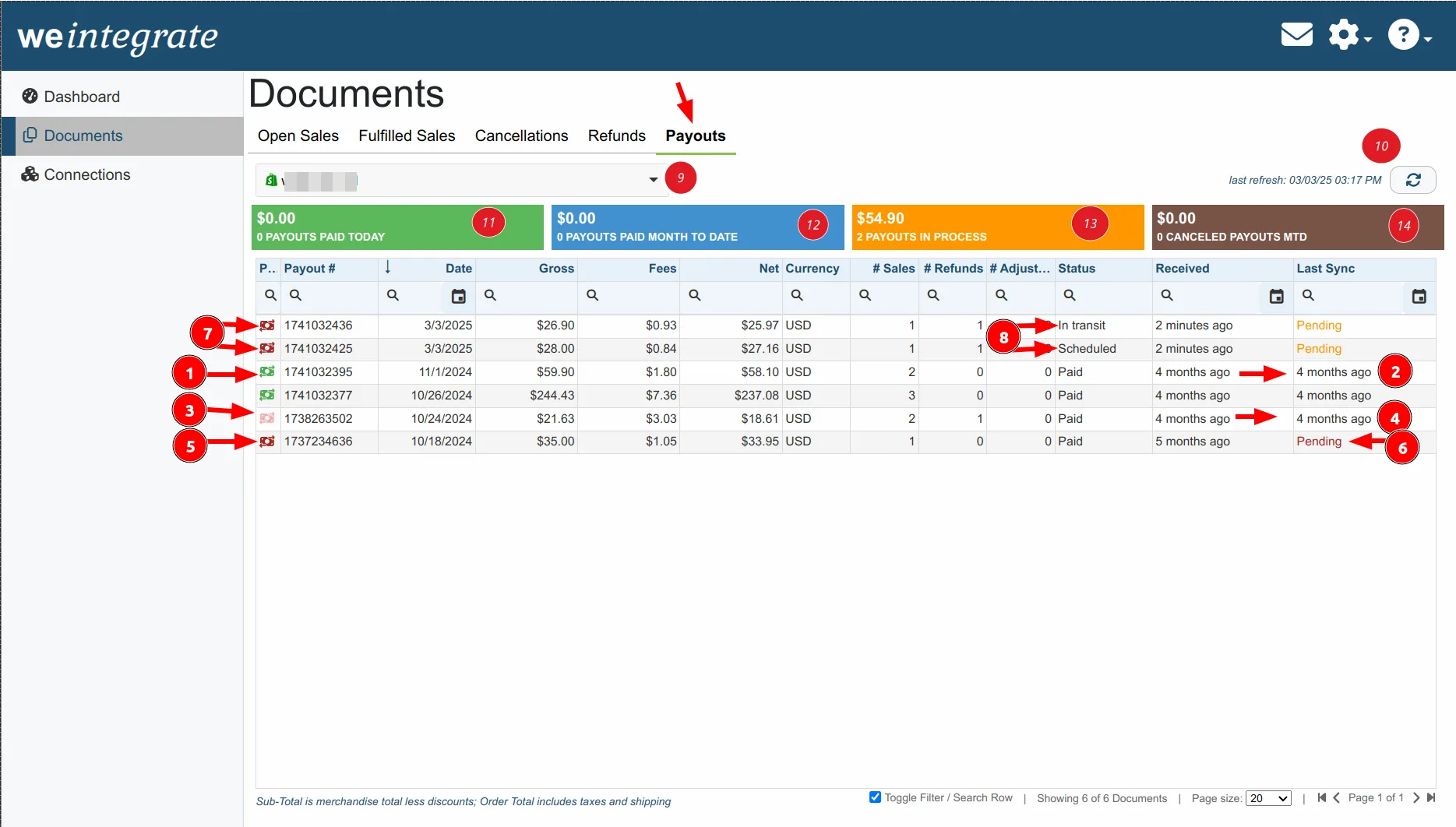
- Scheduled — Transactions assigned; not yet submitted to bank
- In transit — Submitted to bank for processing
- Paid — Deposited into your bank account
- Failed — Declined by the bank
- Canceled — Canceled by Shopify
The QuickBooks deposit is created when the payout reaches Paid status. If a payout fails or is canceled, WeIntegrate handles it accordingly — no orphaned deposits in QuickBooks.
Discrepancy Detection Built In
Payout reconciliation can surface edge cases: a dispute filed after the payout settled, a chargeback adjustment that doesn’t align, an adjustment that came through in a different cycle. WeIntegrate detects these automatically — something that’s only possible because every order is individually linked to the deposit. With a journal entry, a $0.03 discrepancy is invisible: the entry posts the net, the bank clears the net, and nothing in QuickBooks tells you there’s a problem until an audit or a confused accountant goes looking.
When WeIntegrate finds a discrepancy between the Shopify payout and the corresponding QuickBooks deposit, it flags the payout immediately. You can see at a glance which payouts are clean (green indicator) and which need a second look (amber for detected discrepancies, red for creation errors). Hovering over the payout icon shows the specific issue — no hunting through two systems required.
What Accountants Are Saying
“Of all the Shopify connectors I’ve experienced, WeIntegrate is taking the deepest approach into this sales channel. Not only does it put accounting integration on autopilot, but the payout feature is a game changer. It’s one of those tools that leverages automation that allows businesses to scale.”
— Dan DeLong, Chief Content Creator at Schoolofbookkeeping.com
“Previously, managing 10 Shopify payouts took over an hour, and now it takes just minutes. WeIntegrate automatically creates deposits, selects orders, and adds processing fees, slashing our workload significantly.”
— Austen Meier, Head Honcho of Squeaky Clean Books
Why Real Deposits Matter
Most Shopify integrations — including the ones your clients may already be using — never create a QuickBooks Online Deposit from a Shopify payout. They post a journal entry. That journal entry may show the correct net cash amount, but it isn’t a Deposit. QuickBooks doesn’t treat it as one, your bank feed doesn’t reconcile to one, and there are no individual orders attached to it.
When your bank imports the Shopify payout, you’re left matching a bank transaction against a journal entry summary — with no way to see which orders are inside it, whether every transaction was captured, or why the amounts might differ by a few cents. A chargeback that posted in a different cycle, a shop cash credit that wasn’t accounted for, a refund processing fee that got swallowed into the net — none of that is visible. It’s just a number. If it’s off, you’re hunting through Shopify’s payout reports and QuickBooks manually, comparing two completely separate systems line by line.
That’s not a reconciliation workflow. It’s a guessing game.
WeIntegrate creates an actual QuickBooks Deposit for each Shopify payout — with every order linked as a line item on that deposit. When the bank transaction clears, QuickBooks can match it directly to the deposit. When there’s a discrepancy, you can see exactly which transaction caused it, down to the penny. When a chargeback or adjustment comes through, it’s on the deposit as its own line, not buried in a summary that rounds to the right number and hides the problem.
Every order. Every fee. Every adjustment. On the deposit. Reconcilable.
How to Enable Payout Sync
Full setup instructions are in the WeIntegrate community help doc for Payouts.
Payout sync works alongside your existing order sync — Sales Receipts created from Shopify orders are the same documents that get assigned to deposits. Everything connects automatically.
Get Started
Start your free 15-day trial and let WeIntegrate handle Shopify payout reconciliation for you. No credit card required.