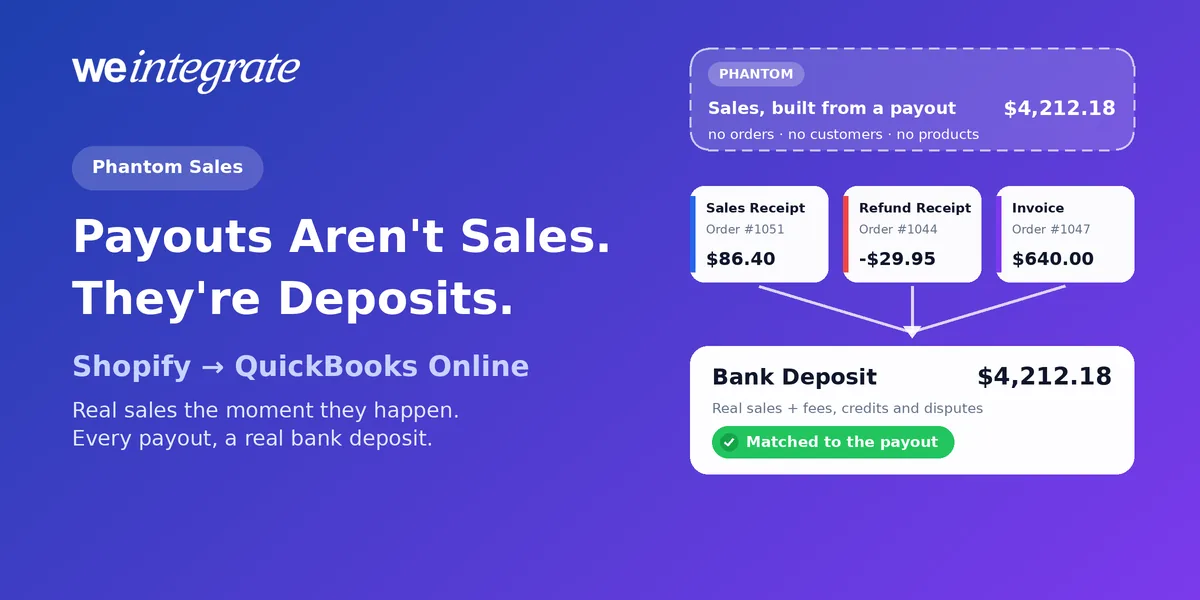
Are your Shopify sales only showing up in QuickBooks Online once Shopify payouts arrive? Open QuickBooks and look for last Tuesday’s sales. With some integrations, you won’t find them — not yet. Those tools wait for Shopify to send you a payout, days later, and only then roll everything in that payout into a single summary. We call the result phantom sales: revenue that shows up as a lump-sum total with no individual sale you can open — no order, no customer, no products, and nothing in QuickBooks until the payout lands. It feels like a shortcut. It’s the start of a much bigger mess, especially at month-end. Here’s the simple rule WeIntegrate is built on: payouts aren’t your sales — they’re deposits. Your sales belong in QuickBooks Online the moment they happen, as real transactions, and your payouts belong there as real bank deposits made of those sales.
Real Shopify sales in QuickBooks Online the moment they happen — not rolled up days later from a payout. Every payout a real bank deposit, reconciled to the penny.
Start Your Free TrialHow “Payout-Driven” Syncing Works
A Shopify payout is the money Shopify sends to your bank — your sales, minus fees, minus refunds, minus any tax Shopify collected and paid to the state for you, usually a few business days after the orders. Payout-driven integrations treat that payout as the starting point for your books:
- They wait. Nothing reaches QuickBooks until Shopify pays out. Weekends, holidays, or a payout on hold stretch the wait further.
- They lump it together. They gather every order, fee, refund and tax in that payout and add them up into a handful of totals. The individual sales behind those totals never reach QuickBooks.
- They post a summary. It all lands as one summary journal entry per payout — one entry standing in for every order inside it. The usual excuse is that recording every order would bog QuickBooks down. It won’t: as we covered in Clearing Accounts, Be Gone, that’s a Desktop-era myth.
- They multiply the summaries. Orders paid through other payment providers get their own separate summaries, and a payout that straddles two months gets split into two more entries at month-end.
The totals can be right. But your books are always a few days behind your store — and they’re built from lump sums instead of from what your customers actually bought.
Why They’re “Phantom” Sales

A real sale has a date, a customer, the products they bought, the discount they used, the shipping and the tax they paid. A phantom sale has a total. It exists only as one slice of a payout summary, rolled up after the fact.
That’s why phantom sales can’t answer the questions you actually have. Click on one and there’s nothing inside it to open: no order number to find, no customer to look up, no line to explain. The money may add up, but the story behind it is gone — and if a total looks wrong, there’s no single sale you can open to find out why.
What Gets Lost When Your Sales Come From Payouts
When your books start at the payout instead of the order, a lot never makes it into QuickBooks:
- Timing. A Monday sale may not appear in QuickBooks until Thursday. A Friday sale, next week. Your numbers are always a few days old.
- Sales outside a Shopify payout. Orders paid through other payment providers become separate summaries, each with its own fees to sort out. Wholesale orders on payment terms end up as a balance in a pending account rather than an invoice to a customer — so you can’t see who owes you what.
- Your customers. One summary per payout means no customer history in QuickBooks: no repeat buyers, no balances, no one to look up.
- Your products. Sales by product vanish into the total, and so does the chance to track inventory in QuickBooks as each order sells.
- The refund trail. A return is netted into a later payout’s summary, disconnected from the sale it reversed.
- Order-level tax detail. Tax arrives as totals inside a summary, instead of sitting on each order with the customer’s address and the exact amount collected — the detail that makes sales tax season painless.
- An audit trail. No one — you, your bookkeeper, or an auditor — can trace a number in QuickBooks back to the Shopify order that created it.
The Bigger Mess: Month-End Turns Into Detective Work
All of that comes due at month-end. Summaries per payout, more summaries per payment provider, extra entries splitting payouts across months, often a “clearing account” to force it all to zero — and someone playing detective when it won’t. As we laid out in Month-End Close That’s a Breeze — No Detective Work Required, a lump-sum month-end runs to a dozen steps before anyone can trust a single report.
Phantom sales don’t make month-end easier. They just move the work there.
The WeIntegrate Way: Sales Are Sales. Payouts Are Deposits.
WeIntegrate starts where your business starts — with the order. Every Shopify order becomes its own real transaction in QuickBooks Online the instant it’s placed, web or in-person POS, retail or wholesale, with the payment method recorded on the order:
- A paid store order becomes a Sales Receipt, and a return becomes a Refund Receipt.
- A wholesale order on terms becomes an Invoice the moment it’s placed — so what that customer owes you is visible right away — then a Payment when they pay and a Credit Memo if you credit them back. It all works even when one QuickBooks company runs both retail and wholesale.
Each one carries the real details: order number, date, discounts, shipping and the exact tax Shopify collected, to the penny — with customers and products matched individually, or rolled into one default catch-all customer and item if you prefer, and the totals reconciling either way. When a product is set up as an inventory item in QuickBooks and you track products individually, the quantity goes down as it sells.
The payout comes second, and it stays what it really is: money moving to your bank. WeIntegrate turns each payout into a real Bank Deposit in QuickBooks Online, assembled from the sales that are already there. The deposit lists the orders it pays out, then the processing fees Shopify took, plus any credits, debits, chargebacks and customer card disputes — each on its own line, even when a dispute settles weeks after the sale. It equals the Shopify payout to the penny, it’s built through QuickBooks’ own Undeposited Funds account the way Intuit intended, and your bank feed matches it with a click. Deposits are created weekly on Startup, daily on Basic, and several times a day on Growth and up.
See It for Yourself: The Three-Way Payout Report
The proof that your sales and your deposits agree is the game changer: the three-way Shopify Payout to QuickBooks Online Bank Deposit Report. It lines up what Shopify paid you, the deposit WeIntegrate recorded, and anything that needed special handling, line by line and order by order. A clean payout shows green. One that doesn’t add up turns amber, and opening it points you to the exact sale, fee or dispute responsible — the opposite of a phantom total with nothing inside. It’s how reconciling Shopify payments stops being a chore, and no other integration we know of offers it, because it depends on real, linked deposit lines. The full report comes with Growth plans and up; Basic includes a basic version.
Taxes and Fees, Never Mistaken for Sales
A payout-built summary makes it easy for the tax Shopify pays to the state on your behalf to blur into your revenue. With WeIntegrate, marketplace sales tax goes to a liability account — money you’re holding for someone else — and shipping labels, import tax and customs duties each get their own account on the deposit, itemized or rolled up. Those dedicated accounts, including merchant fees, come with Professional plans and up.
Real Sales All Month, a Calm Month-End
With real sales recorded as they happen and every payout already a matched deposit, there’s nothing to rebuild when the month ends — you check your payouts, open anything amber, and run your reports. In between, you get real financial visibility: today’s sales, cash and what customers owe you, whenever you look. WeIntegrate supports QuickBooks Online in the US, Canada, the United Kingdom and Australia, plus the Global edition, and setup takes about 10 minutes.
Get Started
Start your free 15-day trial and connect Shopify to QuickBooks Online in about 10 minutes — real sales the moment they happen, every payout a real bank deposit, reconciled to the penny. No phantom sales. No credit card required.
See Also
- Month-End Close That’s a Breeze — No Detective Work Required — why lump sums turn month-end into a dozen-step hunt.
- The Enhanced 3-Way Shopify Payout to QuickBooks Online Deposit Report — every fee, tax and difference on one screen.
- How to Reconcile Shopify Payments in QuickBooks Online — Automatically — zero manual matching.
- Clearing Accounts, Be Gone — why WeIntegrate never needs a workaround account.
- Marketplace Facilitator Tax in Your Shopify Payout Isn’t Revenue — keeping tax Shopify collects for you out of your sales.
- The Lump-Sum Myth: Every Shopify Order Belongs in QuickBooks Online — why every order should be its own real transaction.