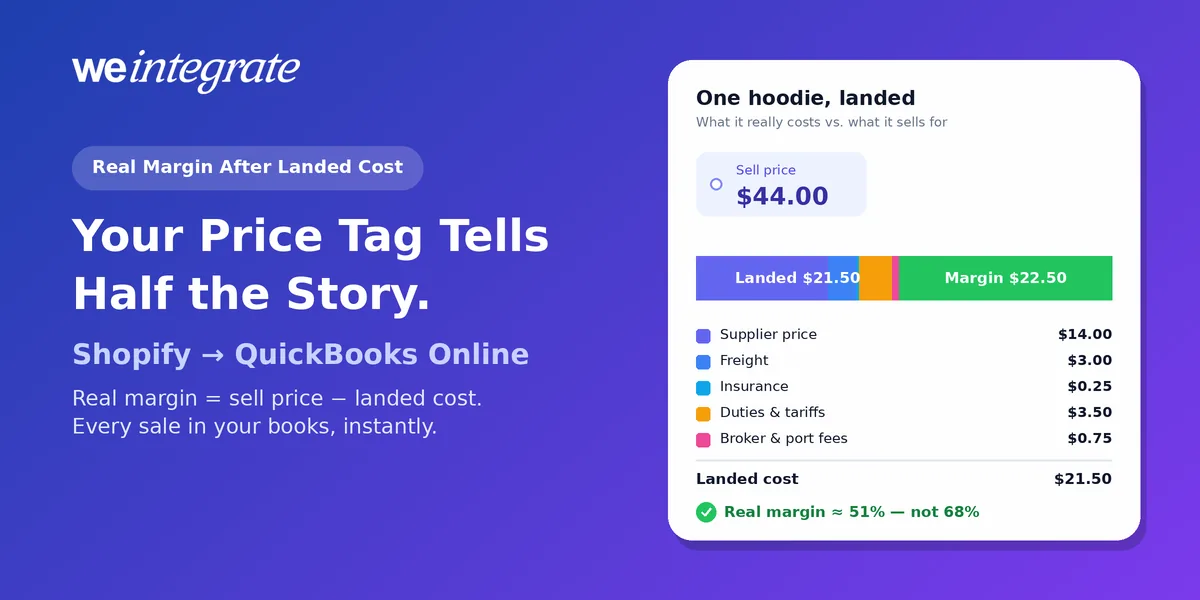
Your hoodie sells for $44. Your supplier charged $14. So you make $30 on every one — right? Not quite. Before that hoodie ever reached your warehouse, it picked up ocean freight, insurance, import duties and a broker’s fee. What one hoodie cost you by the time it’s in your warehouse and listed is its landed cost, and the gap between landed cost and sell price is your real margin — the number your QuickBooks Online books should be showing you. For Shopify merchants, knowing it matters more than ever: since August 29, 2025, imports valued at $800 or less no longer get duty-free treatment in the US, so even small-parcel imports now carry duties — and every shipment’s landed cost deserves a fresh look. WeIntegrate records every Shopify sale in QuickBooks Online the moment it happens, as a real transaction with each product on its own line, so your sell price and your landed cost meet in the books every day — not in a spreadsheet at month-end.
See your real margin every day — every Shopify sale in QuickBooks Online instantly, product by product, reconciled to the penny.
Start Your Free TrialThe Price Tag Is Only Half the Story
Two numbers decide whether a product actually makes you money:
- Sell price — what the customer really pays you, after any discount.
- Landed cost — the supplier price plus every cost of bringing it in: freight, insurance, duties and broker fees.
Here’s the hoodie in real numbers. Say you order 400 of them:
- Supplier invoice: $5,600 ($14.00 each)
- Ocean freight to your warehouse: $1,200
- Cargo insurance: $100
- Import duties and tariffs: $1,400
- Customs broker and port fees: $300
That’s $8,600 for 400 hoodies — a landed cost of $21.50 each, not $14. At a $44 sell price, you keep $22.50 a hoodie before selling costs, not the $30 the supplier invoice suggested. On 400 hoodies, that’s a $3,000 difference between what you think you’re making and what you’re actually making.
Margin or Markup? Know Which One You’re Quoting
These two get mixed up all the time, and they tell very different stories about the same hoodie:
- Markup compares your profit to your cost: ($44 − $21.50) ÷ $21.50 = about 105%.
- Margin compares your profit to your sell price: ($44 − $21.50) ÷ $44 = about 51%.
Margin is the one that tells you how much of every dollar you keep — and the one a supplier-price-only cost overstates. Shopify’s help center gives the price you paid the manufacturer, “excluding taxes, shipping, or other costs” as the example of what to enter as a product’s cost. Follow that, and the margin in Shopify’s profit reports is calculated before landed costs: based on the $14 supplier price alone, the hoodie shows a margin of about 68%. The landed truth is about 51%.
Where Landed Cost Belongs in QuickBooks Online
For accounting, the costs of getting goods to you are part of what the goods cost. The IRS puts it plainly: for merchandise you buy, “cost means the invoice price minus appropriate discounts plus transportation or other charges incurred in acquiring the goods” (IRS Publication 538).
In QuickBooks Online, that cost lives on your inventory items:
- Inventory tracking is available in QuickBooks Online Plus and Advanced. Each product you track becomes an inventory item with a quantity and a cost.
- The cost comes from what you buy. The unit cost on your bills (and checks or expenses) for that stock sets what each item is worth on your books.
- When an item sells, QuickBooks moves that cost out of inventory and into cost of goods sold (more on that below).
- QuickBooks Online Plus and Advanced have no built-in way to spread freight or duties across items. Intuit’s landed cost tool is a QuickBooks Desktop Enterprise feature. In QuickBooks Online, the simplest approach is to build freight, duties and fees into each item’s unit cost when you enter the bill for the shipment. Your accountant can confirm the right method for your business.
Tariffs and freight rates have shifted repeatedly since 2025, so recalculate landed cost for every shipment rather than reusing last season’s number.
What COGS Is — and How It’s Tracked
Cost of goods sold (COGS) is what the products you actually sold cost you — not everything you bought. The 400 hoodies sitting in your warehouse are an asset: stock you own. Only when a hoodie sells does its cost become an expense. On your profit and loss report, COGS sits right under sales, and the difference between the two is your gross profit.
For one hoodie, it looks like this:
- Sale: $44.00
- COGS: $21.50 — its landed cost
- Gross profit: $22.50
There are two ways a business can track COGS:
- As each sale happens. This is how QuickBooks Online Plus and Advanced track inventory items. When you buy stock, its cost goes onto your balance sheet as inventory. When an item sells, QuickBooks moves that item’s cost out of inventory and into COGS on the same transaction, using either first in, first out (FIFO — the oldest stock’s cost goes first) or a moving average cost. When a refund puts the item back on the shelf, its cost goes back into inventory. Your COGS, gross profit and stock value are current every day.
- In one catch-up at the end of the month. Without a record of which products sold, COGS gets worked out after the fact: count what’s left in stock, then take opening inventory plus purchases, minus closing inventory. It takes a physical count, and until someone does it, your profit is a guess.
Whichever way you track it, COGS is only as right as the cost behind it. If an item’s cost in QuickBooks is the $14 supplier price instead of the $21.50 landed cost, every hoodie sold understates COGS by $7.50 — and overstates your profit by the same amount.
Two Kinds of “Duties” — Don’t Mix Them Up
- Duties you pay to import your stock are part of your landed cost. They belong in your inventory cost.
- Duties and import taxes Shopify collects from your international customers at checkout, and pays on their behalf, are not your cost at all. They’re money you collected and owe on your buyer’s behalf. WeIntegrate routes them to their own accounts on the payout deposit (customs duty, import tax) on Professional plans and up, so they never inflate your sales or distort your margin.
How Lump-Sum Syncing Erases Your Margin
You can get landed cost exactly right and still never see your margin, if your sales reach QuickBooks the wrong way.
Many integrations post Shopify sales as a single daily or weekly lump sum — one summary journal entry standing in for every order — or wait for a Shopify payout before posting anything. A summary like that has a total, but no products. So:
- Cost of goods sold doesn’t follow each sale. Without product lines, QuickBooks can’t move each item’s cost out of inventory as it sells. Profit looks inflated until someone posts a correction.
- Inventory counts drift from what’s actually on your shelves, and fixing them becomes a month-end chore.
- Discounts and fees disappear into the total, so you can’t see which promotion ate your margin.
- Your real margin only shows up after month-end detective work — the dozen-step hunt we described in Month-End Close That’s a Breeze — No Detective Work Required.
WeIntegrate Puts Sell Price and Landed Cost Side by Side
WeIntegrate records every Shopify order as its own real transaction in QuickBooks Online, instantly:
- A paid order becomes a Sales Receipt — QuickBooks’ record of a sale paid on the spot — and a refund becomes a Refund Receipt tied to that sale.
- A wholesale order on terms becomes an Invoice — the bill you send — then a Payment when it’s paid, and a Credit Memo — a credit you owe the customer — if something comes back.
When you track each product individually and set it up as an inventory item in QuickBooks Online Plus or Advanced, every sale shows up on its own product line. QuickBooks then moves that item’s cost — your landed cost, when you’ve built it into the item — into cost of goods sold on that same sale. Refunds put the item back into stock. Discounts can be recorded as their own line items, so you can see exactly what each promotion cost you, and the shipping your customer paid gets its own line.
The payout side stays just as clear. Each Shopify payout becomes a real Bank Deposit in QuickBooks Online, listing the orders it pays for plus the processing fees Shopify took — recorded as the business expenses they are. The game-changing three-way Shopify Payout to QuickBooks Online Bank Deposit Report shows every payout next to its deposit, line by line (the full report comes with Growth plans and up).
The result is real financial visibility. Any morning, open QuickBooks and see what each product sold for, what it cost to land, and what you really kept — current today, not after close.
A Five-Minute Margin Routine
- When a shipment arrives: add up freight, insurance, duties and fees, and build them into each item’s unit cost on the bill.
- Before you mark something down: run the numbers against landed cost. At 25% off, the hoodie sells for $33 — still a 58% margin on the supplier price, but only about 35% once landed cost is counted. Make sure what’s left covers fees and shipping.
- Once a week: look at product-level sales and cost in QuickBooks Online, and spot any product whose margin is slipping.
- When tariffs or freight rates change: recalculate before the next reorder, not after the next month-end.
WeIntegrate supports QuickBooks Online in the US, Canada, the United Kingdom and Australia, plus the Global edition, and setup takes about 10 minutes.
Get Started
Start your free 15-day trial and connect Shopify to QuickBooks Online in about 10 minutes — every sale on its own product line, instantly, so your real margin is in your books every day. No credit card required.
See Also
- Your Products, Your Way: How WeIntegrate’s Powerful Item Matching Keeps Your Books Accurate — product-by-product sales and inventory.
- You Asked, We Listened: Shopify Discounts Now Available as QuickBooks Online Line Item Too — see exactly what each promotion cost you.
- Customs Duties on International Shopify Orders Are a Pass-Through Liability — why duties your buyers pay aren’t your cost.
- Month-End Close That’s a Breeze — No Detective Work Required — why lump sums turn month-end into a dozen-step hunt.
- The Lump-Sum Myth: Every Shopify Order Belongs in QuickBooks Online — why every order should be its own real transaction.
- The Enhanced 3-Way Shopify Payout to QuickBooks Online Deposit Report — every fee, tax and difference on one screen.