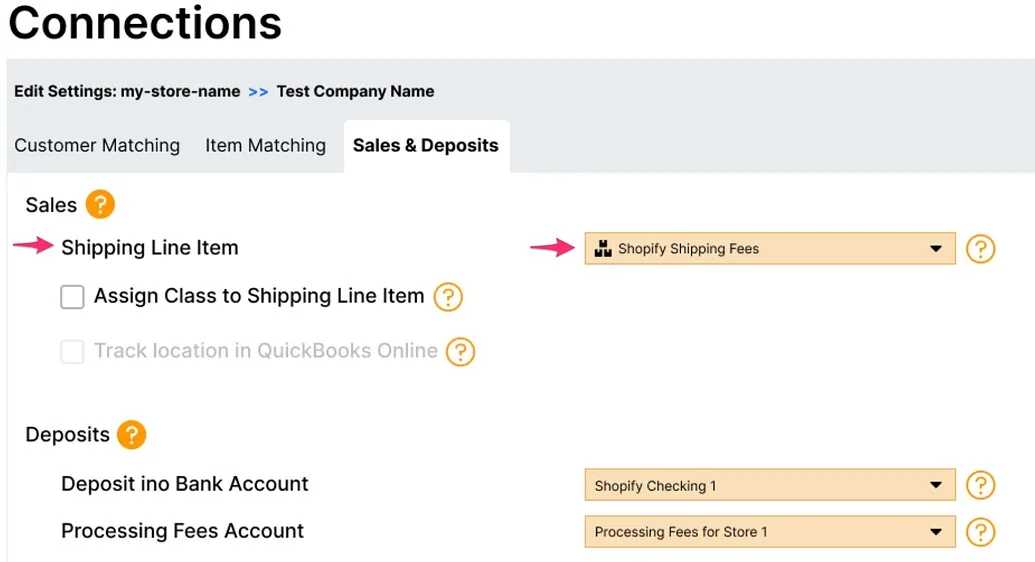
One of the most-requested features from WeIntegrate customers is live: Shopify shipping fees now map to a dedicated Service-type line item on QuickBooks Online Sales Receipts and Refund Receipts — instead of the default QBO Shipping field that has quietly been causing tax discrepancies for merchants across the country.
This isn’t a minor tweak. For any Shopify merchant dealing with sales tax on shipping, this changes everything.
#1 trusted automated accounting integration and instant sync between Shopify and QuickBooks Online (QBO). Penny-accurate real transaction details, not batched error-prone summary journals.
Start Your Free TrialThe Problem With QBO’s Default Shipping Field
QuickBooks Online’s built-in shipping field looks like the obvious place to put shipping revenue. It isn’t. The default field doesn’t support sales tax overrides — meaning you can’t control whether shipping is taxable on a per-transaction basis. That’s a real problem because shipping taxability in the United States varies by state. Some states tax shipping. Some don’t. Some tax it only when it’s bundled with taxable goods.
Shopify already handles this correctly — it knows exactly which shipping charges are taxable based on the destination state and your nexus configuration. But when that data lands in QBO’s Shipping field, the tax treatment gets flattened. The result: a persistent, low-grade mismatch between what Shopify collected and what QuickBooks recorded.
How Shipping Line Items Fix It
When shipping fees map to a Service-type line item instead, WeIntegrate automatically manages the tax checkbox status on that line item per transaction — matching exactly what Shopify applied. Taxable when Shopify taxed it. Exempt when Shopify didn’t. No manual intervention, no blanket rules that break in half the states you sell into.
Beyond sales tax accuracy, shipping appears as its own visible, reportable line on every Sales Receipt. Your shipping revenue is no longer buried in a field that’s easy to overlook — it’s a line item you can report on, reconcile against, and audit like any other.
Shipping line items also unlock a more powerful capability: with line items in place, you can enable WeIntegrate’s Shopify sales tax override for QuickBooks Online — replacing QBO’s calculated sales tax entirely with the exact amounts Shopify collected. This eliminates rounding discrepancies between the two platforms so your QBO tax figures match Shopify to the penny, every time.
Assign an Account and Optionally a Class
The shipping line item configuration in WeIntegrate’s Sales & Deposits settings gives you two controls:
- Service item — select any Service-type item from your QBO company to represent shipping fees. The income account attached to that item is where your shipping revenue posts. One setup, applied automatically to every transaction.
- Class assignment — if your QBO company uses class tracking, you can optionally assign a class to every shipping line item WeIntegrate creates. Shipping revenue gets categorized consistently for reporting without touching individual transactions.
Both settings are store-specific, so if you’re managing multiple Shopify connections in a single QBO company, each connection can carry its own shipping item and class.
One Configuration, Every Transaction
Set it once in your Sales & Deposits settings and WeIntegrate applies it to every Sales Receipt and Refund Receipt from that point forward. No per-order adjustments, no manual cleanup of shipping amounts, no hunting down why your QBO totals don’t match your Shopify payouts.
The full setup details are in the shipping line item mapping documentation.
Clean Shipping Data, Finally
The default QBO Shipping field was a shortcut that created long-term accounting noise. This is the right way to handle it — a proper line item with correct tax treatment, a real income account, and optional class tracking.
If your Shopify shipping revenue has never looked quite right in QuickBooks, this is why — and this is the fix.
Start your free 15-day trial and configure shipping line item mapping as part of your 10-minute setup. No credit card required.