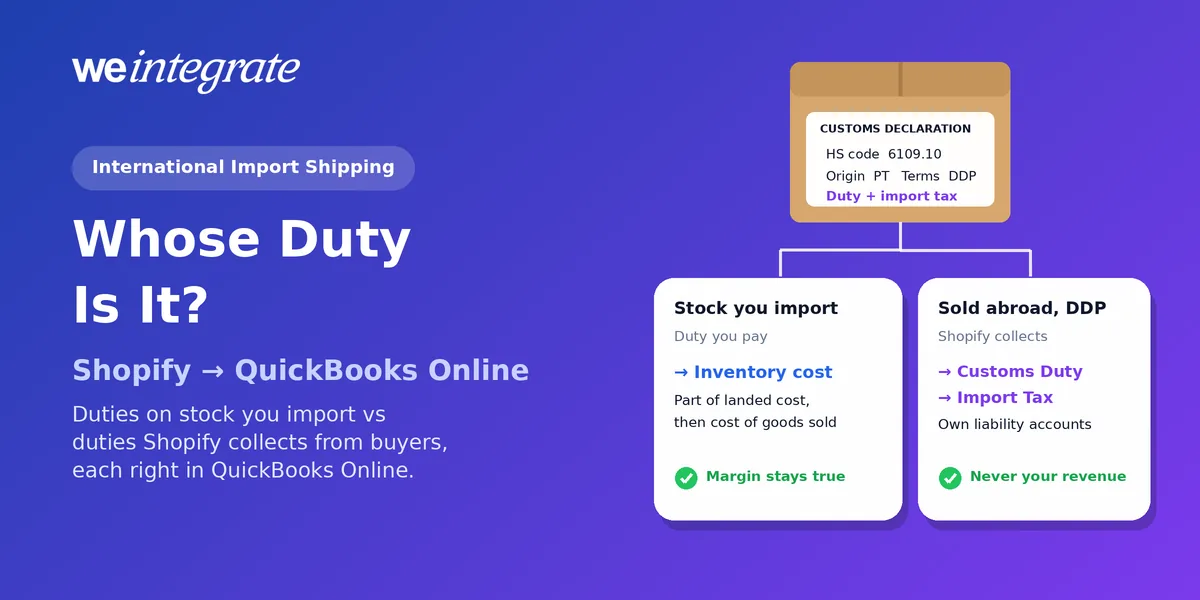
Shopify’s guide International Import Shipping: 2026 Tariff Guide, by Joe Hitchcock (last updated February 24, 2026), is one of the clearest starting points for any merchant who brings goods across a border. It walks through HS codes, who pays duties and when, sourcing and fulfillment choices, and the paperwork customs expects. What a shipping guide can’t do is keep your books straight once the goods have landed and the orders start coming in. That’s the other half of importing — and in QuickBooks Online, it comes down to one question: whose duty is it? Answer that correctly and WeIntegrate records every sale instantly and keeps every payout and every duty Shopify collects exactly where it belongs, to the penny.
Cross-border sales without the accounting headache — every Shopify order in QuickBooks Online instantly, with duties and import taxes kept out of your revenue.
Start Your Free TrialWhat Shopify’s Guide Gets You Ready For
Shopify’s guide is worth reading in full. In short, it covers:
- Classifying your products with HS (Harmonized System) codes — the international product codes customs uses to decide what duty applies — and recording each product’s HS code and the country it was made in.
- Deciding who pays the duty and when: collected at checkout and shipped DDP (delivered duty paid), or paid by the customer on delivery under DAP (delivered at place).
- Managing tariff exposure by spreading sourcing across suppliers and countries, and by importing in bulk to a local fulfillment partner.
- Getting the paperwork right, from the commercial invoice to the certificate of origin and packing list, with specific product descriptions rather than vague ones.
Shopify’s update already covers the Supreme Court’s February 20, 2026 ruling that the International Emergency Economic Powers Act does not authorize the President to impose tariffs, and US duties have been reset again since then. Low-value shipments no longer get a pass, either: US Customs and Border Protection stopped applying the $800 de minimis exemption from August 29, 2025, regardless of where goods come from. In June 2026, CBP made that suspension indefinite and noted that Congress ends the exemption outright on July 1, 2027. The practical lesson: check the current rate for each HS code before every order you place with a supplier, rather than relying on last season’s numbers.
Two Kinds of Duties — and Why QuickBooks Must Keep Them Apart
A Shopify business that imports and sells internationally meets duties from two directions. They look alike on a customs form. In your books, they’re opposites.
Duties You Pay on the Stock You Import
When you bring in inventory, the duty, freight, brokerage and insurance you pay are part of what those goods cost you. They belong in your landed cost, which is the real cost of each unit once it’s on your shelf. In QuickBooks Online Plus and Advanced, that means building them into each inventory item’s cost when you enter the supplier bill, so that every sale moves the true cost into cost of goods sold. Leave the duty out and every sale overstates your profit. We walked through a full example in Your Price Tag Tells Half the Story — Know Your Real Landed Cost.
Duties and Import Taxes You Collect From International Customers
When you sell abroad and use Shopify’s duties and import taxes collection to charge them at checkout and ship DDP, the picture flips. Shopify’s Help Center describes customs duty as “a charge applied to shipments by the receiving country or region’s customs authority”, and import taxes as charges a country’s customs authority applies to shipments above its de minimis. Either way, your customer paid them and they’re owed to a government. That money was never your revenue and it isn’t your expense. It’s a liability — money you’re holding for someone else.
That’s exactly how WeIntegrate records it. On Professional plans and up, when a Shopify payout includes duties or import taxes, WeIntegrate posts each to its own account on the payout’s QuickBooks Online Bank Deposit: customs duties to a dedicated liability account, and import tax to a separate one. Your sales stay your sales, your balance sheet shows what you owe, and the deposit still matches the payout to the penny.
A Five-Step Import-to-Books Routine
- Code every product before it sells abroad. Shopify needs HS codes for international orders when you collect duties at checkout; without one, the duty it charges is likely to be wrong. Add the code and country of origin when you create the product, not after the first order is stuck.
- Choose your duty display on purpose. Shopify lets you show duties as a separate line at checkout or include them in your prices. Showing them as a line keeps them clearly the customer’s. If you build them into your prices, you’re absorbing the duty yourself, so ask your accountant where that cost belongs.
- Put every import cost on the supplier bill. When a shipment arrives, add the duty, freight and brokerage fees to the item costs on the bill in QuickBooks Online, so each unit carries its full landed cost.
- Give collected duties and import taxes their own accounts. Set up the customs duty and import tax accounts in WeIntegrate’s deposit settings (Professional and up), so nothing Shopify collects for a government ever lands in your income.
- Let each payout prove it. Every Shopify payout becomes a real Bank Deposit in QuickBooks Online made of the actual orders, fees and duty lines. On Growth and up, the three-way Shopify Payout to QuickBooks Online Bank Deposit Report lines each one up against what Shopify paid and turns amber if anything doesn’t add up.
Why Lump-Sum Books Can’t Keep Up With Cross-Border Selling
A daily or weekly summary journal entry rolls your sales, fees, duties and import taxes into a few totals. In a cross-border business, that’s where the trouble starts. Duties collected for a foreign customs authority sit inside a sales number. Nobody can trace an import tax line back to the order it came from. And when tariffs change mid-season, there’s no record of which orders were charged at which rate.
WeIntegrate keeps it real instead. Every Shopify order becomes its own transaction in QuickBooks Online the moment it’s placed — a Sales Receipt for a sale paid on the spot, or an Invoice for a customer on terms — with its own products, prices and tax. Every payout becomes a real Bank Deposit made of those orders. Every duty and import tax Shopify collects has its own account. When the rules change again, your books show exactly what happened, order by order.
Selling From Outside the US?
The same applies if your store is based elsewhere. WeIntegrate supports QuickBooks Online in the US, Canada, the United Kingdom and Australia, plus the Global edition for many more countries, carrying the exact GST, HST or VAT collected on each order — see Shopify and QuickBooks Online, internationally.
Get Started
Start your free 15-day trial and connect Shopify to QuickBooks Online in about 10 minutes — every cross-border order a real transaction the moment it’s placed, with duties and import taxes kept out of your revenue and every payout reconciled to the penny. No credit card required.
See Also
- Customs Duties on International Shopify Orders Are a Pass-Through Liability. WeIntegrate Ensures Your QuickBooks Balance Sheet Reflects That — duties Shopify collects, in their own account.
- Shopify Collects Import Tax from Your International Buyers. WeIntegrate Makes Sure QuickBooks Online Doesn’t Mistake It for Your Income — import tax, kept separate.
- Your Price Tag Tells Half the Story — Know Your Real Landed Cost — duties on imported stock belong in your costs.
- Black Friday Cyber Monday 2026: Sell Every Minute, Book Every Order — getting the busiest weekend’s cross-border orders right.
- The Enhanced 3-Way Shopify Payout to QuickBooks Online Deposit Report — every payout, deposit, fee and duty on one screen.
- Marketplace Facilitator Tax in Your Shopify Payout Isn’t Revenue — another tax Shopify handles for you, booked right.