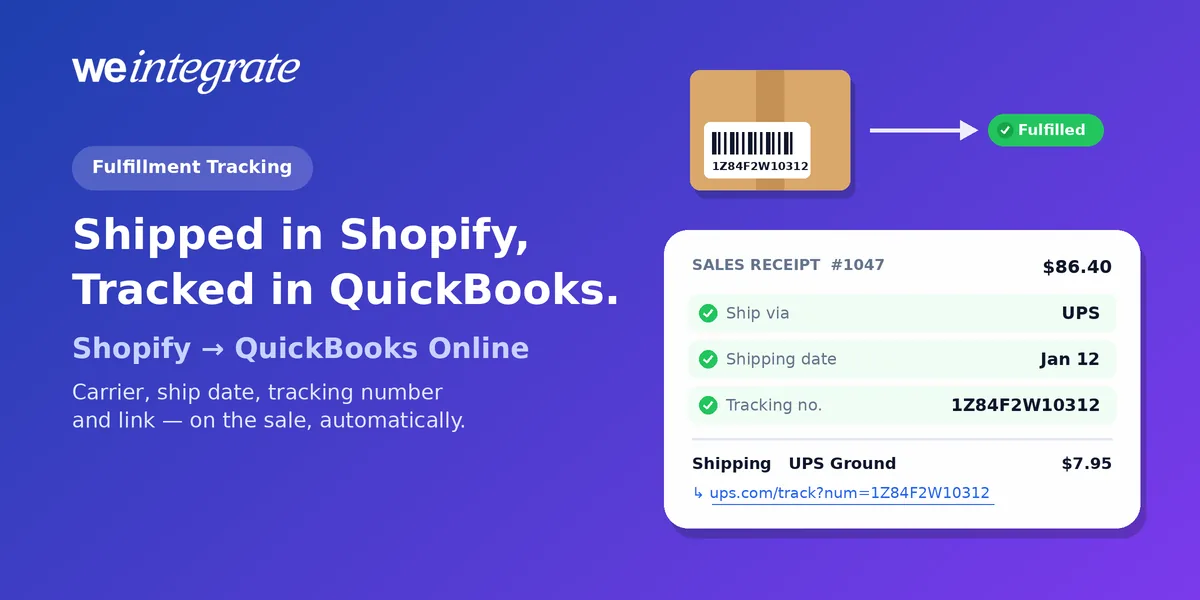
A customer emails: “Where’s my order?” Your bookkeeper asks the same thing about a wholesale invoice that’s two weeks unpaid. With a summary-entry integration, answering means leaving QuickBooks Online, searching Shopify for the order, and copying a tracking number back by hand. With WeIntegrate, the answer is already on the sale. The moment Shopify marks an order fulfilled — or partially fulfilled — its Sales Receipt or Invoice in QuickBooks Online updates automatically with the carrier, the ship date, the tracking number and the tracking link — Shopify fulfillment tracking, inside your books, with no copy-pasting.
Every tracked Shopify shipment recorded on its own sale in QuickBooks Online — carrier, ship date, tracking number and tracking link, automatically.
Start Your Free TrialA Lump Sum Can’t Ship
Shipping details need somewhere to live. An integration that posts a daily or weekly summary journal entry — one entry standing in for every order in that day or week — has nowhere to put them. There’s no single sale to hold a ship date, a carrier or a tracking number, so the shipment story stays in Shopify while the money sits in QuickBooks. Two systems, two halves of every order, and you in the middle stitching them back together whenever someone asks.
That gap shows up at the worst moments: a customer insists a package never arrived, a wholesale buyer won’t pay until they see proof it shipped, or your accountant wants to know why an order from last month still looks open.
What Lands on the Sale When You Ship
WeIntegrate already records every Shopify order in QuickBooks Online as a real transaction, instantly: a Sales Receipt (QuickBooks’ record of a sale paid on the spot) for retail orders, or an Invoice (the bill you send) for wholesale and terms customers. When you fulfill that order in Shopify, WeIntegrate updates the same document — no second document, no duplicate sale:
- Ship via — the carrier Shopify reports for the latest shipment, such as UPS or USPS.
- Shipping date — the day the latest shipment was fulfilled in Shopify.
- Tracking no. — that shipment’s tracking number, in QuickBooks’ own tracking field.
- The tracking link — on the order’s shipping line, after the shipping method your customer chose, so whoever opens the sale can look the package up.
The first three are QuickBooks Online’s own shipping fields, not a note or a memo, so they appear where your team and your accountant already expect them.
Split shipments, every link
Not every order ships in one box. When Shopify marks an order partially fulfilled, WeIntegrate updates the sale with that first shipment; when the rest goes out, it updates again. QuickBooks’ tracking field holds a single number, so it carries the latest shipment’s number and date — and the shipping line lists the tracking link for each shipment that has one, one per line, so you can see every tracked box.
Works with your shipping setup
The tracking link rides on the shipping line whichever way you record shipping: QuickBooks Online’s standard shipping, or your own Service item (a QuickBooks product-and-service entry for things that aren’t stock) through WeIntegrate’s shipping line item setting, which keeps shipping income on its own line with its tax matched to what Shopify charged.
See It in Your Dashboard Too
Fulfillment isn’t only written to QuickBooks — it’s visible in WeIntegrate. Fully fulfilled orders move to the Fulfilled Sales tab of your WeIntegrate documents, with the date WeIntegrate received the fulfillment and the time it last synced the sale to QuickBooks Online; partially fulfilled orders stay on Open Sales until the last item ships. The Fulfilled Sales guide walks through every column, and Understanding your documents explains how all five tabs fit together.
Why It Pays Off
- Faster answers. “Did it ship?” is answered from the sale in QuickBooks Online, without opening Shopify.
- Proof that travels with the invoice. When a wholesale customer asks for proof of shipment, the carrier, date and tracking number are on the Invoice they owe.
- A cleaner audit trail. Each sale shows what was sold, what was charged, what tax was collected and when and how it shipped — one document, the whole order. That’s what per-transaction books give you that summaries can’t.
- Nothing to remember. There’s nothing to turn on in WeIntegrate and no step to add. Fulfill in Shopify with the carrier and tracking number, the way you always have.
And when the order’s payout arrives, WeIntegrate turns it into a real Bank Deposit in QuickBooks Online, holding that sale (or the payment on its invoice) and the fees Shopify took — so every order paid through Shopify Payments runs from sale to shipment to deposit, to the penny.
Get Started
Start your free 15-day trial and connect Shopify to QuickBooks Online in about 10 minutes — every order you ship gets its carrier, date and tracking added to its sale in your books. No credit card required.
See Also
- Understanding your documents — the five WeIntegrate tabs, from Open Sales to Payouts.
- Shopify Shipping Fees Now Get Their Own QuickBooks Online Line Item — shipping income on its own line, tax matched.
- Invoices, Payments, and Credit Memos Are Live — wholesale and terms orders as real Invoices.
- Balanced Books and Correct Books Are Not the Same Thing — why one document per order matters.
- Shopify Payouts to QuickBooks Online Deposits — every payout as a real Bank Deposit.
- Location Isn’t Just a Field — where-it-sold detail on your Sales Receipts.