Yes, it’s April Fools’ Day — but there’s no fooling around when it comes to your documents. Most Shopify integrations create a summary and call it done. WeIntegrate creates real QuickBooks documents — Sales Receipts, Refund Receipts, and actual QBO Deposits — for every stage of an order’s life, from the moment it’s placed in Shopify to the payout landing in your bank account.
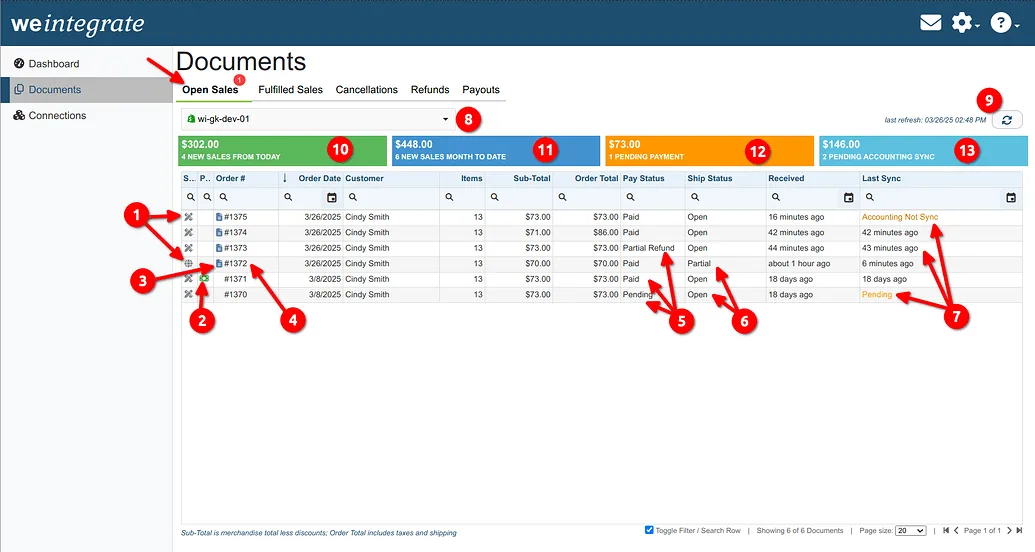
Those documents live across five tabs in your WeIntegrate dashboard. Here’s what each one does and why it matters for your books.
Automated, accurate accounting and instant sync: sales, refunds, fulfillments, inventory, payouts, tax — real transaction details, not batched, delayed summaries.
Start Your Free TrialOpen Sales
The Open Sales tab is where it all starts. Every new Shopify order — web store, POS, admin console, or third-party marketplace — appears here the moment it’s created. WeIntegrate immediately generates a QuickBooks Sales Receipt for paid orders, with a Refund Receipt added automatically if a partial refund occurs before fulfillment.
Orders stay in Open Sales until they’re fulfilled, cancelled, or fully refunded. Think of it as your live order pipeline — a real-time view of what’s in motion and what’s already landed cleanly in QuickBooks.
Pending orders (payment not yet received) are tracked but held: WeIntegrate does not sync a Sales Receipt to QuickBooks until payment is confirmed. Your books only reflect what’s actually been paid.
Fulfilled Sales
The Fulfilled Sales tab is your record of completed business — every Shopify order that has been fully fulfilled and its corresponding QuickBooks Sales Receipt.
This is the tab your accountant lives in. Every fulfilled order becomes a real Sales Receipt in QuickBooks, linked to the Shopify order number, with line items, sales tax, shipping, and fees all correctly mapped. No summaries, no journal entries — actual transaction documents with a full audit trail back to the originating Shopify order.
For orders where a partial refund was also processed, the matching Refund Receipt appears alongside the Sales Receipt. The full picture of what was sold and what was returned, in one place.
Cancellations
The Cancellations tab tracks every Shopify order that was cancelled and ensures your QuickBooks records reflect it accurately.
Cancellations that had no payment simply close cleanly. Cancellations where payment was taken — and subsequently refunded — generate a Refund Receipt in QuickBooks automatically. Those orders also appear on the Refunds tab, so nothing falls through the cracks regardless of which tab you’re working from.
The cancellation reason and date are captured, giving you a clear record of why orders didn’t complete — useful for spotting patterns and keeping your revenue reporting accurate.
Refunds
The Refunds tab captures every order where a customer received money back — whether a partial refund on a fulfilled order, a full refund, or a refund tied to a cancellation.
Each refund generates a QuickBooks Refund Receipt automatically. Not a manual journal entry adjustment. A real Refund Receipt, linked to the original Sales Receipt, with the correct amounts and account mappings already applied. Your refund records in QuickBooks match exactly what Shopify processed, without any manual reconciliation.
For merchants handling a high return volume — especially after peak seasons — this is the tab that prevents January from becoming a catch-up nightmare.
Payouts
The Payouts tab is where WeIntegrate does something no other Shopify-to-QuickBooks integration offers.
Every Shopify payout — a net deposit of gross sales minus fees, refunds, and adjustments — is automatically matched to a real QuickBooks Online Deposit. Not a journal entry. An actual Deposit, with every Sales Receipt and Refund Receipt from that payout period assigned as individual line items. Processing fees, credits, debits, disputes, and adjustments each appear on their own line.
When your bank transaction clears, QuickBooks can match it directly to the deposit. If there’s a discrepancy — a chargeback, a shop cash credit, a rounding difference — WeIntegrate flags it automatically. The full picture of every payout, reconciled and traceable to the penny, without switching between Shopify and QuickBooks to piece it together manually.
It’s the document-level approach taken all the way to the bank.
The Full Picture
Every order that comes into Shopify follows a path: placed, fulfilled (or cancelled or refunded), and eventually paid out. WeIntegrate creates real QuickBooks documents at every step of that path — so your books are always current, always accurate, and always traceable back to the source.
For a deeper look at how each tab works, the full documentation for each is in the WeIntegrate community:
Start your free 15-day trial and see every document type working automatically from day one. No credit card required.