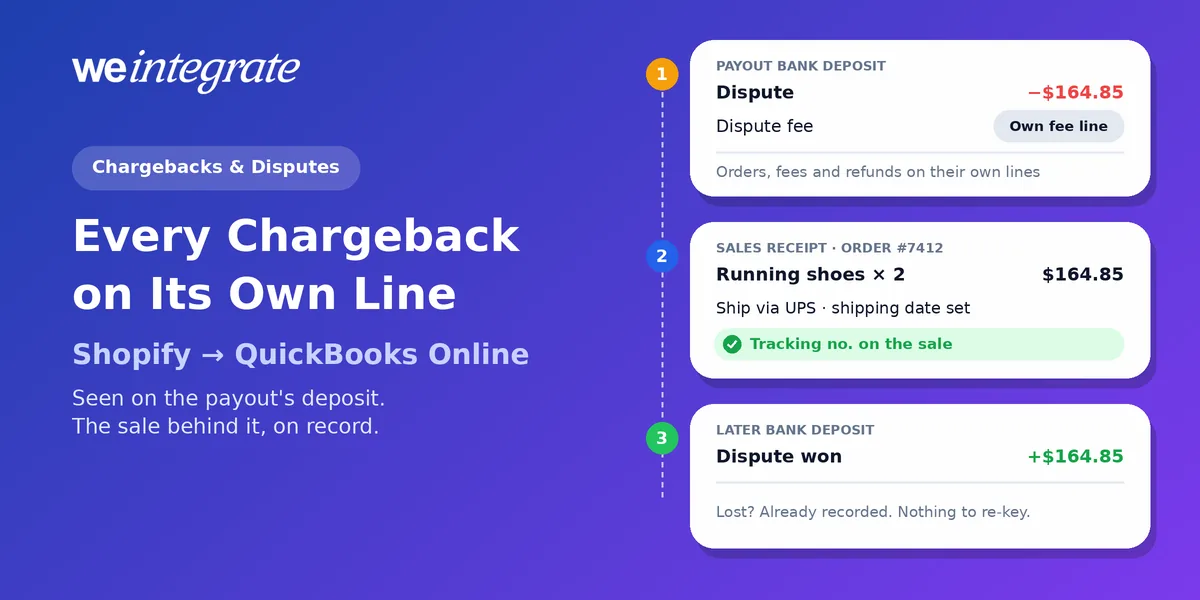
Tuesday’s Shopify payout lands $164.85 lighter than the orders inside it — plus a dispute fee. A customer says two pairs of running shoes never arrived. That’s a chargeback, or dispute — when a customer disputes a card charge, and, for a chargeback, their bank takes the money back while it decides. If your QuickBooks Online books hold one lump sum per day or per payout, that $164.85 simply makes the total a little smaller. Nobody notices until month-end, if then. With WeIntegrate, every Shopify chargeback arrives as its own line on a real Bank Deposit, as soon as that payout’s deposit is built, with the original sale already in QuickBooks Online to open.
See every Shopify dispute on its own line of a real QuickBooks Online Bank Deposit — with the original sale already on record, to the penny.
Start Your Free TrialWhat a Dispute Does to Your Money
Shopify explains it plainly: when a cardholder disputes a charge, “the bank takes the disputed amount from you right away”, and it also charges you a chargeback fee. With Shopify Payments, that money comes out of your next available payout.
From there it goes one of two ways. Win, and you get the disputed amount back (and, in some countries, the fee). Lose, and the money goes to the customer for good. Either way, the money moves days or weeks after the sale, inside a payout full of unrelated orders.
That timing is exactly why disputes are hard to keep track of — and why the way your books record them matters as much as how you fight them.
Lump Sums Hide the Pattern
Disputes often aren’t random. The same shipping carrier, the same product, the same slow refund: patterns show up early, if you can see them.
Summary-entry integrations make that hard. When a payout arrives as one summary journal entry (a lump-sum accounting entry standing in for many orders), a dispute is just one more number folded into the net. It’s often not tied to any order you can open in QuickBooks, so nobody spots it, and the fee that came with it is just another amount in the same summary, with no order behind it. With a clearing account, a dispute that doesn’t match leaves a balance that won’t go to zero, and no clue why. Either way, the answer is back in Shopify, and someone has to go looking — usually at month-end, when it takes a dozen steps to trust a single report.
One dispute is annoying. A pattern of them can cost you far more, and a lump sum is the last place it will show up.
How WeIntegrate Puts Every Dispute in Plain Sight
WeIntegrate records Shopify the way it actually happens:
- The sale is already there. Every order reaches QuickBooks Online instantly as a real Sales Receipt (QuickBooks’ record of a sale paid on the spot), or an Invoice for wholesale orders on terms.
- The shipment is on the sale. When the order ships with tracking, the carrier, ship date and tracking number land on that same Sales Receipt or Invoice.
- Refunds are on record. A refund arrives as its own Refund Receipt (or Credit Memo for wholesale), tied to the sale it reverses, the moment you issue it. More on refunds.
- The dispute gets its own line. When Shopify takes the money back, the payout becomes a real QuickBooks Online Bank Deposit with the dispute on its own line, the dispute fee on its own fee line, and every order, fee and refund around them, to the penny. A dispute you win comes back the same way, on its own line of a later deposit, along with any fee Shopify returns.
Nothing is netted, nothing is guessed, and nothing waits for month-end.
Fewer Disputes Start Before the Bank Gets a Call
Shopify’s own prevention guide is upfront that no checklist stops every dispute. What you can do is close the gaps that send customers to their bank. Shopify’s advice depends on the reason for the dispute, and complete books make each move easier:
- “I never got it.” Shopify suggests online tracking and delivery confirmation where you can. With the tracking number on the sale in QuickBooks Online, anyone on your team can answer “where’s my order?” without opening Shopify, before the customer calls their bank.
- “I asked for a refund and never got it.” Shopify’s advice is to refund as soon as possible. Every Refund Receipt in QuickBooks Online carries its date and amount, so you can see a refund was issued, and when.
- “I was charged twice.” Shopify says to refund an accidental double charge right away. Because each order is its own document, a true duplicate stands out instead of hiding in a daily total.
- “I don’t recognize this charge.” Shopify recommends a billing statement name your customers will recognize. That one lives in your Shopify settings, and it’s worth a look today.
- “That wasn’t me.” Shopify flags risky orders with its fraud analysis — review a high-risk order before you ship it, and cancel it if it doesn’t look right.
The bigger win is the pattern. Once every dispute is a line you can see, three disputes on the same product or the same carrier in a few weeks are hard to miss.
Handling a Dispute in Five Steps With WeIntegrate
- Spot it. Open the payout’s Bank Deposit in QuickBooks Online: the dispute and its fee each sit on their own line. WeIntegrate also marks every payout green when it matches its deposit and amber when something doesn’t, and depending on your plan the game-changing 3-way Shopify Payout to QuickBooks Online Bank Deposit Report shows the Shopify payout and the QuickBooks Online deposit line by line, with anything that needs attention pulled out and linked to its order, so you see what’s behind the difference. See what the report shows.
- Open the sale. Find the order’s Sales Receipt or Invoice in QuickBooks Online: customer, products, shipping, tracking number and any refund, all on record. Here’s how to trace any order in seconds.
- Respond in Shopify. Submit your evidence from the Shopify admin before the deadline Shopify shows you. Your evidence comes from Shopify; your books already told you which order and what happened.
- Let the outcome book itself. If you win, the money comes back on its own line of a later Bank Deposit. If you lose, the dispute line already recorded it. Either way, there’s no entry to type and no clearing account to fix.
- Match and reconcile. Each payout is one deposit that equals what reached your bank, so it matches your bank feed (the transactions QuickBooks pulls in from your bank) and reconciles cleanly. Here’s how payouts reconcile.
For the business owner, that’s an answer in minutes. For the bookkeeper or accountant, it’s every dispute traceable to its payout and every payout traceable to its orders, with no detective work required.
Financial Visibility, Disputes Included
Disputes are part of selling online. Not knowing about them doesn’t have to be. With every order and refund in QuickBooks Online instantly, and every fee and dispute on its payout’s Bank Deposit, your sales, your profit and your cash stay current every day, not just after month-end close. That’s financial visibility, instantly.
WeIntegrate supports QuickBooks Online in the United States, Canada, the United Kingdom and Australia, plus the Global edition for more countries. See every feature, or compare plans on our pricing page.
Get Started
Start your free 15-day trial and connect Shopify to QuickBooks Online in about 10 minutes — then open your next payout’s Bank Deposit and see every order, fee and dispute on its own line, to the penny. No credit card required.
See Also
- Reconcile Shopify Payouts in QuickBooks Online Without Playing Detective
- Shipped in Shopify, Tracked in QuickBooks Online — Automatically
- Trace Any Shopify Order in QuickBooks Online in Seconds
- The Enhanced 3-Way Shopify Payout to QuickBooks Online Deposit Report
- Sync Shopify Refunds to QuickBooks Online Automatically
- Month-End Close That’s a Breeze — No Detective Work Required